
- Home
- Fiber Internet
Fiber Internet
Otari Village’s Internet service is a high-speed Internet service delivered over a fiber-optic network.
Service Plans (Tax Included)
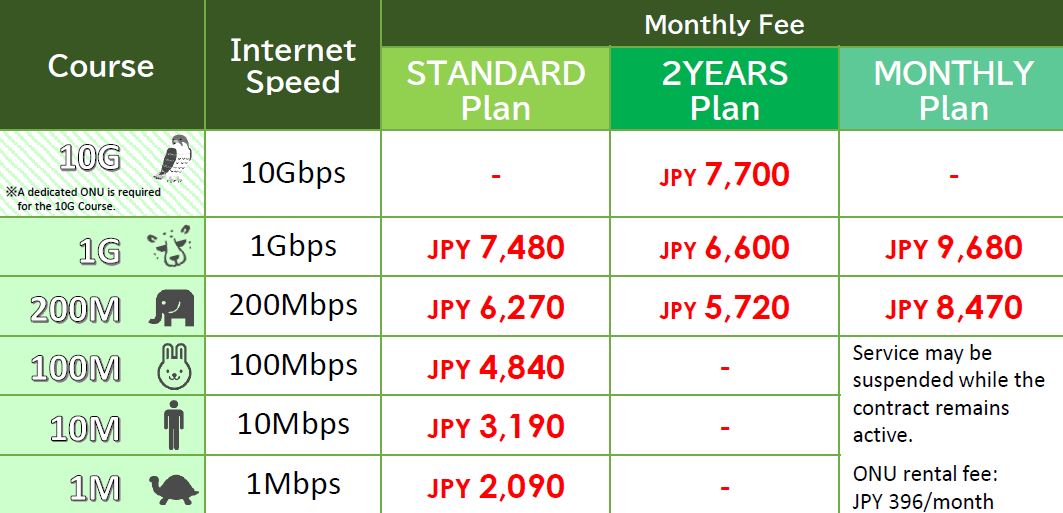
1. The Standard Plan has a minimum service period of 12 months and renews automatically.
2. The 2YEARS Plan is a 24-month contract that automatically renews every 24 months.
3. The Monthly Plan can be used on a month-to-month basis. To suspend service, please contact us by the 25th of the month before the suspension begins. To restart service, please contact us by the 25th of the month before the restart.
4. The 10G Course requires a dedicated ONU. When changing from another course to the 10G Course, or from the 10G Course to another course, the ONU must be replaced. The replacement fee is 6,600 JPY.
Our Internet service is provided on a best-effort basis and does not guarantee a specific connection speed. Actual speeds may vary depending on network congestion, the servers being accessed, and the customer’s usage environment, including the router, computer operating system, and device specifications.
Five Things to Check to Get the Most from 10G
View Details
1. LAN Cable
○ Cat6A or Higher
△ Cat6
× Cat5e or Earlier
Check the category printed on the side of the cable, such as “CAT6A.”
Cat6 cables can support 10G over short distances. Check both the cable between the ONU and router and the cable between the router and computer.
2. Router WAN Port
○ 10G Compatible
△ 2.5G or 5G
× 1G
This is the Internet-side port that connects the router to the ONU.
If this port supports only 1G, your connection will be limited to 1G even if the other equipment supports 10G. Check the router specifications for wording such as “10G WAN.”
3. Router LAN Port
○ 10G Compatible
△ 2.5G or 5G
× 1G Only
This is the port used to connect a computer or other device with a cable.
Check the labels on the back of the router or the “LAN” section of its specifications. Many routers have only one 10G-compatible LAN port.
4. Wireless LAN Wi-Fi
○ Wi-Fi 7 or Wi-Fi 6E
△ Wi-Fi 6
× Wi-Fi 5 or Earlier
Wi-Fi speeds vary depending on distance, walls, and surrounding radio interference. Even the latest Wi-Fi standards will not provide the full 10Gbps speed.
For devices where speed is especially important, we recommend using a wired connection.
5. Computer or Smartphone
○ 10G or 2.5G-Compatible LAN
○ Wi-Fi 7 or Wi-Fi 6E Compatible
× 1G LAN or Older Wi-Fi
Check the specifications of your computer’s LAN port, including any USB LAN adapter, or the Wi-Fi standard supported by your device.
If the device is older, the connection speed will be limited to the maximum speed supported by that device.
First, check whether the router’s WAN port and the cable between the ONU and router support 10G.
To achieve speeds exceeding 1 Gbps on a single device, the entire connection path to that device must also support the required speed.
Wired connection: 1, 2, 3 and 5
Wi-Fi connection: 1, 2, 4 and 5
The maximum speed of 10 Gbps is provided on a best-effort basis. Actual speeds vary depending on the customer’s usage environment.
Please download the internet application form from this link.
If you choose “Bank Account” as your payment method, please download the bank transfer request form from this link.